Counting without watching
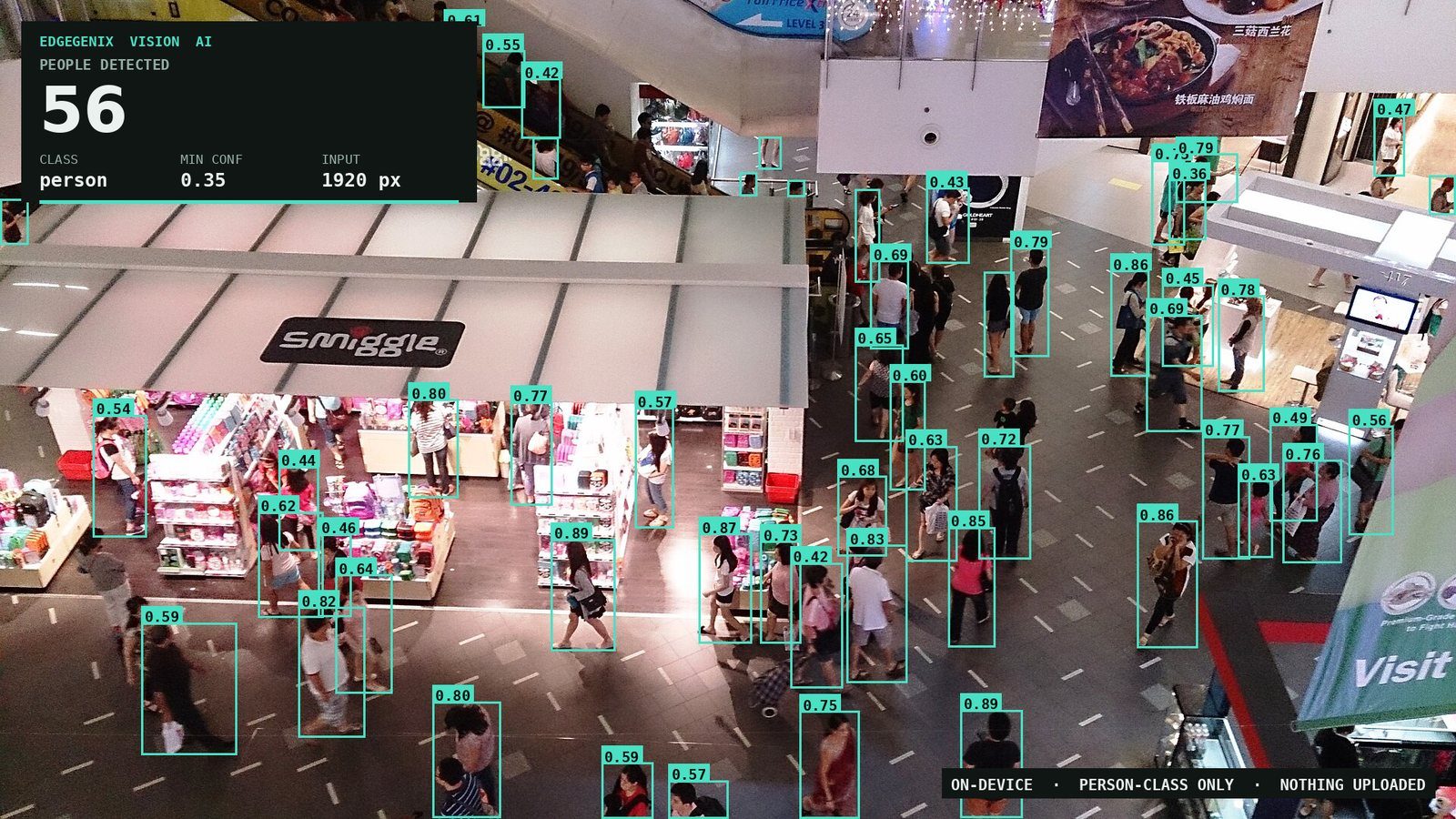
A live headcount, without a face, a name, or a video feed leaving the site. Here is what that takes, and what it's actually worth.
Ask a centre manager how many people are on the concourse right now and the honest answer is usually a shrug. Ask a retail operations lead how long the queue at register three has been building and it's whatever a staff member remembered to radio in. Ask a safety officer how many contractors are still inside a permit-required zone and the clipboard by the door is doing a lot of load-bearing work.
None of these are exotic problems. They're all the same question — how many people are in this space, right now — and for years the only ways to answer it were to pay someone to watch a screen, or to stream every frame every camera produces to somebody else's data centre and hope the answer came back in time. The first doesn't scale past a handful of cameras. The second brings a bandwidth bill, a privacy conversation, and a system that stops working the moment the internet does.
There is a third option, and it's the one we build. Put the detection next to the cameras, on hardware sized for it, and send the answer rather than the stream. Normal operation is a count and a timestamp — a few kilobytes — instead of a continuous video river. Footage travels when something has actually happened, or when a person asks to see it.
This objection always comes first, so let's deal with it first: there is no facial recognition here, and no identity of any kind.
Our detection model answers one narrow question about a frame — is there a person-shaped thing here, and how confident am I? The output is a box and a score. It never asks who. There's no face crop, no biometric template, no database to match against, because the system was never given one. The same person walking past twice produces two unrelated boxes, with nothing linking them, because nothing in the pipeline ever created an identity that could be linked.
That's worth being precise about, because "camera AI" gets used to mean everything from a people counter to a watchlist system, and they are not the same technology. Anonymity here isn't a policy promise sitting on top of a system that could do more — it's a property of how the thing is built.
Being equally precise about the video, because this is where a lot of vendors overclaim: producing the count never requires footage to leave the site. That's the part the architecture guarantees. Video does move when there is a reason for it to move — an alert carries a keyframe or a short clip so the finding has evidence attached, and an operator who needs to look at something can pull a live view. What never has to exist is the thing cloud inference depends on: every camera streaming everything, all day, to be processed somewhere else. So the honest sentence to the people in that building is not "no video ever leaves" — it's that they are counted continuously and looked at only when something warrants it, with a record of who looked and why.
Two things do the work, and the split between them is the whole design.
Edgegenix Edge AI runs the detection on the asset, on the Edgegenix AI Box — a compact, ruggedised unit built with our hardware partner and rated for the places cameras actually live: a plant room, a ceiling void, a pole, a yard. It sits alongside the cameras you already own and reads their standard streams. Nothing gets ripped out and replaced.
This is the part people most often get wrong when they hear "edge AI": the inference does not happen inside the camera. It happens on the box next to it. That distinction is the entire commercial point — it's why this works with the cameras already on your wall instead of requiring a forklift upgrade to a fleet of smart ones. It's also why the numbers are what they are: inference runs on the Box's NPU in under 40 ms end to end, because there is no network anywhere in that loop.
Edgegenix Cloud AI is where the answers land. Counts and events sync up — kilobytes at a time — into the same verified Common Operating Picture as every other field signal we carry: live occupancy per zone, trends across a week, the thresholds and who gets told when one is crossed, and an audit-grade evidence trail for anything that mattered — which is where the keyframes and clips attached to an alert live, alongside the live view an operator can call up when a number needs a human eye on it. Occupancy stops being a separate dashboard and becomes one more layer on the picture your operations centre already watches.
Existing fixed cameras, standard streams. No replacement, no new cabling run for AI.
The Edgegenix AI Box runs capture, preprocess, infer and detect locally — under 40 ms.
A count, a confidence, a timestamp, a zone. Clips travel on an alert or on request — not continuously.
Occupancy, trends, thresholds, alerts and the evidence trail, on one Common Operating Picture.
People ask which of the two layers they need. Usually the answer is both, because they're doing genuinely different jobs:
| Edgegenix Edge AI | Edgegenix Cloud AI | |
|---|---|---|
| Answers | What is happening in this frame, right now | What has been happening, across every camera and every day |
| Speed | Fast enough to act on — no network in the loop | Fast enough to decide on — minutes and hours, not milliseconds |
| If the link drops | Keeps detecting and keeps a local record | Catches up when the link returns — ECIA stores and forwards so nothing is lost |
| Good for | Zone breaches, occupancy caps, anything with a siren or an interlock on the end of it | Utilisation reporting, staffing patterns, incident review, board-level numbers |
The practical reason to keep them separate is that detection never decides anything. The model's entire output is an observation: a count, a confidence per box, a timestamp. Whether that observation is worth a dashboard tile, a text message or nothing at all is a rule — an occupancy cap, a dwell time, a restricted zone — and rules live above the model. So you can drop a cap from 40 to 32 before a holiday weekend without going anywhere near the detector, and every alert can answer "why did this fire?" with the specific detection and the specific rule it crossed.
The scenarios below are the kind of deployment this is built for, described so you can see whether your problem is shaped like one of them. They're illustrative, not a customer's published results.
A printed roster can't see a dead Tuesday afternoon or an unplanned Saturday rush, and both cost money. When queue depth and waiting time cross a threshold you set, the call to open another register gets made on the floor, in the moment, instead of in hindsight.
Painted exclusion zones depend on training and after-the-fact review. A local count of a restricted lane can drive an immediate local response — a light, a klaxon, a machine interlock — the instant someone steps into it, with no round trip to anywhere.
A drill and a real evacuation turn on the same question in the first chaotic minutes: is everyone out? Because occupancy is already being counted per zone, incident command can read the last known headcount off the system instead of waiting on a sign-in sheet.
Everyone knows which rooms are permanently booked and permanently empty, but nobody has the numbers to act. Continuous occupancy — a number, not a video feed — turns into booked-hours versus occupied-hours, which is a floor plan decision you can defend.
Worth saying plainly: the detection model is the same family we already run in production for smoke and flame. Once a platform can find one class of object in a live stream, on constrained hardware, in real time, adding another class is largely a data and configuration exercise rather than a new product. That's why this is deployable now rather than a research programme — it's a new capability on infrastructure that already exists.
The image at the top of this article is not a mockup or a marketing render. It's the unmodified output of the Edgegenix Vision AI model, person class only, and we picked a deliberately hard frame: an overhead wide angle across two levels, dense foot traffic, people half-hidden behind each other, and figures at every distance from a few metres to the far end of the concourse. Those are the exact conditions that make this harder, which is the point. Running the easy case and publishing it would prove nothing.
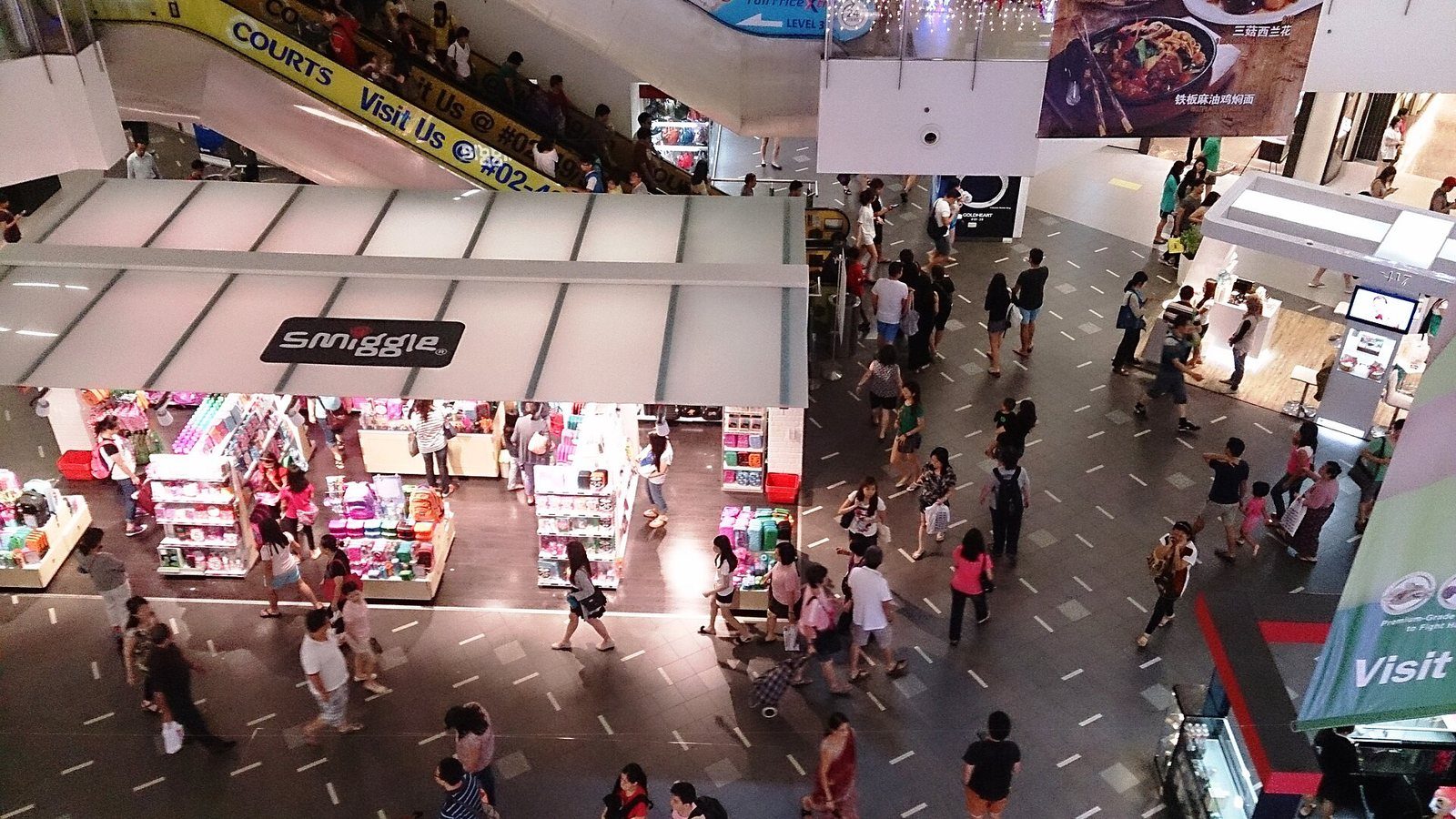
Same frame, before and after — person class only, minimum confidence 0.35
Every box was drawn by the model. None were added, removed or nudged, and no class other than person was permitted to draw anything — which is why the mannequins in the shopfront and the faces printed on the advertising above the escalator aren't boxed. They are person-shaped, and a general-purpose detector would have had opinions about several of them.
The confidence spread is worth reading rather than averaging. Close, unobstructed people score in the mid-0.8s. Small, distant, half-occluded ones sit near the 0.35 floor. That isn't the model being unreliable — it's the model telling you, per person, how much of them it could actually see. A system that reports one flattering number for a whole scene has thrown that information away.
One frame proves the model can find people. A clip proves it can keep finding them — as they walk behind pillars, merge into groups, and reappear. This is a 28-second run across a far busier concourse than the one above, every frame processed, with the count and the running peak on screen as it happens.
854 frames · person class only · counts and peak updated per frame, no smoothing
The number moves, and we've left it moving. There is no tracking layer here holding a figure steady between detections and no averaging window smoothing the graph — each frame is counted on its own merits, so when the count wobbles it wobbles on camera. That is the honest version. A production deployment adds persistence on top of exactly this, for the same reason our smoke detection does: a single frame is an observation, and you want a couple of them agreeing before anything with a siren on the end of it fires.
For the engineers reading: same image, same model, same threshold, and only the resolution we fed it changed.
| Input size | People found | What changes |
|---|---|---|
| 640 px | 13 | Only large, near-field figures survive — everyone upstairs is below the effective minimum |
| 1280 px | 44 | Mid-distance shoppers appear; overlapping pairs still resolve as one |
| 1920 px | 56 | Far-field and partly occluded figures resolve; compute cost rises with it |
A four-fold swing in the answer with the model held constant. This is the variable that quietly determines whether a people-counting deployment works or disappoints, and it's almost never in the brochure — which will quote a model and a frame rate but not the input size those numbers were measured at. On a wide concourse it dominates everything else, and it trades directly against compute. Which is exactly why it should be set per site, with the camera geometry in front of you, rather than inherited from a default.
What we're not claiming. Fifty-six is what the model found above 0.35. It is not a claim that fifty-six people were in that concourse — there are figures deep in the background it didn't draw, and there's no verified ground-truth count for a stock photograph, so we won't publish a recall percentage for it. Worth separating two different numbers here, because they get conflated constantly. A benchmark score — the kind we publish for our object detection models — is measured on a standard dataset and tells you how the model ranks against others. It is a real number, and it is not a promise about your site. What your site gets is a calibration pass: your camera, your mounting angle, your lighting, checked against a hand-counted sample. Ask any vendor which of those two they're quoting you. If they can't tell you, that's the answer.
For anything that needs to stand up later — a safety case, a compliance question, an incident review — detections can be written to an append-only local record. That's what answers "how many people were on the floor at 14:32" six weeks after the fact, rather than a live number that was true for a second and then gone.
Exhibit photograph: Crowd inside nex shopping center by ProjectManhattan, CC BY-SA 3.0, via Wikimedia Commons. Detection overlay produced by Edgegenix.
Send us a clip from one of your cameras and we'll process it and walk you through what came back — counts, confidences and where it struggled. Thirty minutes, your footage, no obligation.
